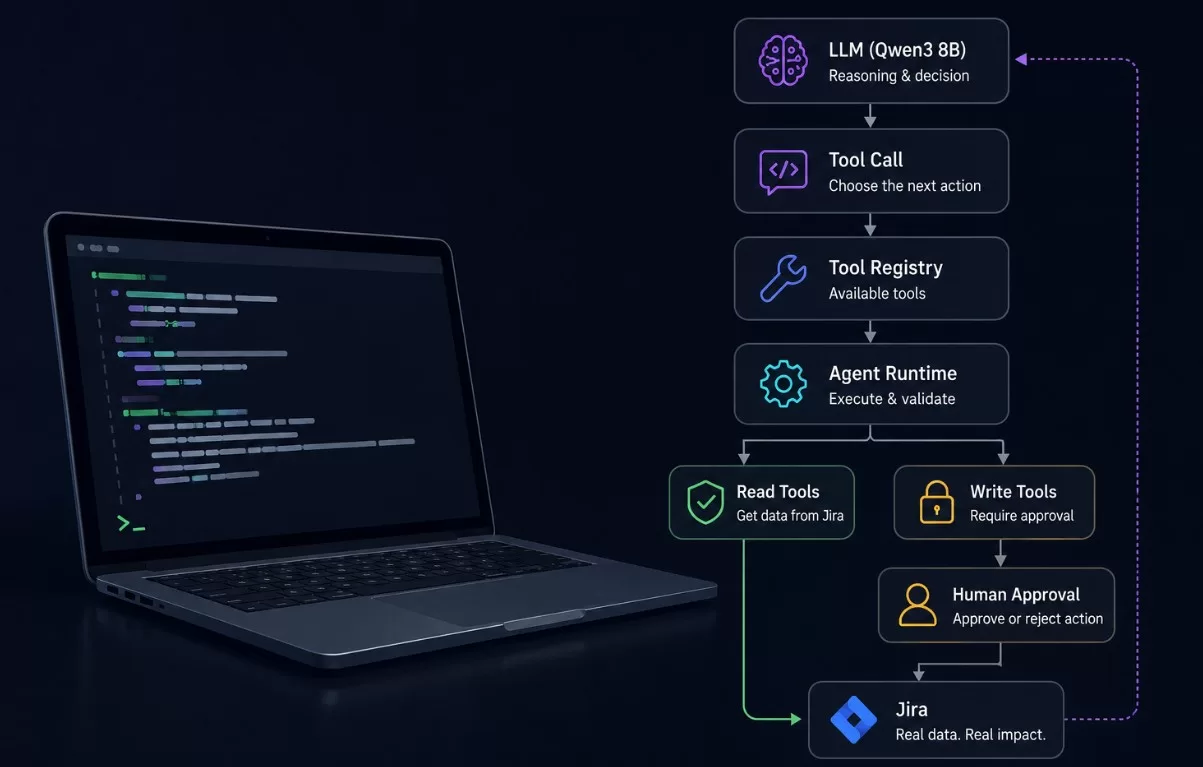
How I started exploring AI Agents by building a small Jira-based Delivery Assistant with Qwen3, Ollama and a simple tool-calling runtime.
Why I started this
Everyone is talking about AI. Everyone is using AI.
But I wanted to answer a more practical question:
How can AI actually help from a Delivery perspective?
My background is in Delivery and Operations, so I’m particularly interested in the problems that Delivery Managers deal with every day:
- What is putting the delivery at risk?
- Which issues need attention?
- What is becoming overdue?
- Where is work getting stuck?
- Which problems are important enough to escalate?
- What could be automated instead of manually monitored?
I learn best by building things, so I decided to start with a small experiment:
Build my own AI Delivery Agent for Jira.
The long-term idea is an AI Delivery Dashboard that could help Delivery Managers understand what is happening across a project, spot risks early and focus their attention where it matters most.
This Jira agent is my first step in that direction.
What I wanted the agent to do
I wanted something more interesting than a chatbot where I ask:
“What is happening in my Jira project?”
Instead, I wanted the system to be able to decide what information it needs.
The basic idea became:
Goal
 ↓
LLM
 ↓
Choose a tool
 ↓
Execute tool
 ↓
Observe result
 ↓
LLM
 ↓
Choose another tool
 ↓
...
 ↓
Final answer
For example:
- Get the current delivery metrics.
- Identify an important risk.
- Investigate the relevant Jira issue.
- Decide whether more information is needed.
- Produce a delivery assessment.
That is the first point where the project started to feel like an agent, rather than just an LLM generating text.
First: build it without AI
Before connecting a real LLM, I built a deterministic mock provider.
This turned out to be one of the most useful decisions.
The mock provider follows a simple state machine:
get_delivery_metrics
        ↓
select important issue
        ↓
get_issue
        ↓
final answer
There is no AI involved.
The Python code contains the decision logic.
Why bother?
Because I wanted to understand the agent runtime independently from the model.
That allowed me to test:
- tool calling
- tool execution
- history
- tool results
- permission checks
- read-only mode
- write approval
without spending money on LLM APIs.
The tool layer
The agent doesn’t have direct access to Jira.
Instead, Jira capabilities are exposed as explicit tools.
Currently the prototype has:
get_delivery_metrics
get_issue
add_comment
transition_issue
Each tool has metadata:
name
description
read_only
function
This creates a very simple boundary:
              Agent
                │
                ▼
          Tool Registry
                │
        ┌───────┴────────┐
        ▼                ▼
      READ             WRITE
        │                │
        ▼                ▼
      Jira         Permission layer
The LLM knows about the tools.
It doesn’t know how Jira authentication works.
It doesn’t receive the Jira credentials.
And it doesn’t execute Python functions directly.
Then I connected a real LLM
Once the runtime worked with the mock provider, I connected Qwen3 8B running locally through Ollama.
This was important to me for two reasons.
First, I wanted to experiment without accumulating API costs.
Second, I wanted to understand what actually changes when the decision-making is moved from deterministic Python rules to an LLM.
The architecture became:
                 Qwen3 8B
                     │
                     │ tool call
                     ▼
              Agent Runtime
                     │
                     ▼
                Tool Registry
                     │
                     ▼
                    Jira
                     │
                     │ result
                     ▼
                 Qwen3 8B
                     │
                     ▼
                Final answer
The model receives the tool definitions and can decide which one to call.
A real run
The current prototype can be started with:
python demo.py --mode readThe runtime checks the local model and Jira connection first:
Mode:        READ_ONLY
Model:       qwen3:8b

Ollama:      OK (qwen3:8b)
Jira:        OK (Eugene)
Then the agent starts its loop:
=== DELIVERY AGENT ===

1. Asking provider for the next step...
   Tool call: get_delivery_metrics({})
   Tool result received from get_delivery_metrics.

2. Asking provider for the next step...

Provider final answer:
The model then produced a delivery risk analysis identifying:
1. Overdue release preparation
KAN-8 — Prepare release v1.0
The due date had passed while the issue was still In Progress.
2. Unassigned high-priority work
KAN-6 — Write API documentation
KAN-10 — Analytics integration
3. High-priority work still in progress
KAN-2 — Implement payment API
KAN-3 — Fix critical production bug
KAN-5 — Setup CI/CD pipeline
This is still a very small dataset, but the important part is the mechanism: the model is working with actual Jira data rather than a predefined answer.
What makes it an Agent?
This was probably the biggest conceptual shift for me.
A normal LLM interaction looks like:
Question
   ↓
LLM
   ↓
Answer
The agent looks more like:
Goal
 ↓
Observe
 ↓
Reason
 ↓
Choose tool
 ↓
Execute
 ↓
Observe result
 ↓
Reason
 ↓
Choose another tool
 ↓
...
 ↓
Final answer
The loop is the important part.
The model doesn’t necessarily know everything it needs from the initial request.
It can request information, receive it, and then decide what to do next.
The safety problem
Once an agent can interact with external systems, another question becomes much more important:
What happens when the model wants to change something?
For example, Qwen can request:
add_comment(
    KAN-3,
    "This critical production bug requires immediate attention..."
)
I don’t want the model to have unrestricted write access.
So I added two permission modes.
READ_ONLY
The agent can use:
get_delivery_metrics
get_issue
but write operations are rejected.
AI
 ↓
add_comment()
 ↓
Agent Runtime
 ↓
DENIED
APPROVAL_REQUIRED
The model can request a write action, but the runtime stops and asks the human:
AI
 ↓
add_comment()
 ↓
Permission check
 ↓
Approve action? [y/N]
 ↓
Human
 ↓
Jira
I tested this with a real Jira issue.
Qwen requested a comment for KAN-3.
I answered:
nThe action was rejected and Jira was not modified.
I then tested the same mechanism with approval enabled and confirmed that the write operation can proceed only after explicit approval.
The important architectural boundary
This became one of the most interesting lessons from the project.
The LLM is responsible for reasoning.
The runtime is responsible for execution and permissions.
In other words:
             LLM
              │
              │ "I want to do X"
              ▼
       ┌───────────────┐
       │ Agent Runtime │
       └───────┬───────┘
               │
        Is X allowed?
          /          \
        YES           NO
         │             │
         ▼             ▼
      Execute        Reject
         │
         ▼
        Jira
The model doesn’t get to decide whether it is allowed to perform an action.
That decision belongs to the runtime.
This seems like a small implementation detail, but I think it becomes a very important design principle as AI agents start interacting with real systems.
Where Jira Automation fits
This experiment also made something else much clearer to me: AI doesn’t replace automation.
There are many things that are better handled by deterministic rules.
For example:
IF issue is overdue
THEN notify the assignee
or:
IF priority = Highest
AND issue type = Bug
THEN notify the delivery team
or:
IF all subtasks are Done
THEN transition the parent issue
These are predictable processes.
Jira Automation is a very good fit.
But consider a different question:
“Which three issues currently represent the biggest delivery risk, and why?”
Now we’re asking the system to interpret several pieces of information and make a judgement.
That’s where an AI agent becomes more interesting.
So my current mental model is:
Deterministic rule
        ↓
Jira Automation

Context + interpretation + judgement
        ↓
AI Agent
And in many real-world workflows, the best solution will probably be both.
What I learned
The biggest value of this project wasn’t the Python code.
It was building a mental model of how AI Agents actually work.
I now think about an agent as several separate components:
                  AI AGENT

                    Goal
                     ↓
                    LLM
                     ↓
                Tool calling
                     ↓
               Agent Runtime
                     ↓
              Permission layer
                     ↓
                   Tools
                     ↓
                  Jira
                     ↓
                Tool result
                     ↓
                    LLM
                     ↓
              Repeat / Finish
Once I understood those boundaries, concepts like tool calling, agent loops and human-in-the-loop became much less abstract.
What’s next?
This is only the first version.
The bigger idea is an AI Delivery Dashboard.
I would like to explore whether an agent could eventually combine things such as:
- Jira delivery metrics
- overdue and stale work
- issue dependencies
- sprint progress
- release readiness
- incident information
- comments and updates
- potentially data from other delivery tools
and turn that into something more useful than another dashboard full of charts.
Something closer to:
“Here is what changed, these are the biggest risks, this is why they matter, and these are the things that probably need your attention today.”
But I don’t want to jump straight there.
For now, I’m interested in learning where traditional automation is enough, where AI actually adds value, and how to introduce AI into Delivery workflows without giving it more autonomy than it should have.
This is the first step.
Learning by building.